
支援與服務選單
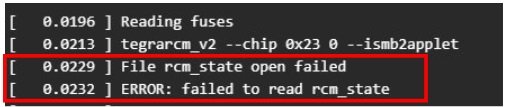
Why I receive ERROR: failed to read rcm_state
-
This indicates a failure to read the Recovery Mode state, There are three possible causes for your reference:
1. Re-enter Recovery Mode before every flash:
Please make sure that each time before you start flashing, you perform the steps to put the device back into Recovery Mode.(Even if the device is already in Recovery Mode, you should manually enter Recovery Mode again before every flash to avoid issues.)
2. Try a different USB Type-C cable :
NVIDIA Jetson is very particular about USB cables. If the cable quality is poor, data transfer may be unstable during flashing and cause failures.
We suggest trying a few different cables.
3. Do not use a virtual machine (VM) as the host.
NVIDIA’s official guidance clearly states not to use a VM environment for flashing.